


Research Edition: 2026.1
Published: August 2026
Geographic focus: United States
Product focus: QuickBooks Desktop for Windows
Research focus: Error patterns, technical causes, diagnostic tools, and publicly available evidence
QuickBooks Desktop errors are usually presented as individual codes.
H202.
H505.
6000.
6123.
3371.
1603.
12002.
To a business owner, these can look like completely unrelated problems.
The underlying technical picture is more structured.
When current QuickBooks Desktop documentation is reviewed by technical layer rather than by error number alone, many problems fall into a smaller group of areas: company-file access, multi-user networking, Windows and installation components, licensing, program behavior and update connectivity.
That distinction matters because the visible error message does not always identify the component that actually failed.
A company file can be healthy while a network connection prevents access to it. A QuickBooks installation can be intact while Windows Installer prevents an update. An update can fail because of firewall or security settings even when QuickBooks itself is working normally.
This report examines those patterns and organizes the major QuickBooks Desktop error families into a practical diagnostic framework.
Key Findings
The research produced five major observations.
First, QuickBooks Desktop errors cluster around identifiable technical layers. The same layer can be responsible for several different error codes.
Second, H101, H202, H303 and H505 belong to the multi-user and hosting environment. Intuit currently describes these errors as situations where something blocks communication between workstations and the computer hosting the company file.
Third, the 6000-series should not be treated as one error. Different combinations can involve company-file access, network configuration, support files, permissions, backups or data damage. Intuit’s current File Doctor guidance specifically covers several 6000-series combinations.
Fourth, installation and licensing errors belong to a different troubleshooting layer. Errors 1601, 1603 and 1642 are associated with installation or update components, while Error 3371 concerns QuickBooks license data. (QuickBooks)
Fifth, public documentation explains how to troubleshoot these problems, but it does not provide a representative national dataset showing how frequently each error occurs or how long each one takes to resolve.
This final gap matters for anyone trying to turn QuickBooks Desktop support information into genuine industry research.
Research Methodology
This report was developed primarily from current first-party Intuit documentation covering QuickBooks Desktop errors, company-file problems, multi-user mode, installation, licensing, updates, and QuickBooks Tool Hub.
The research reviewed documentation covering:
- H101
- H202
- H303
- H505
- 6000-series errors
- 6123
- 6150
- 6189 and 6190
- 3371
- 1601
- 1603
- 1642
- 12002
- 12007
- 12009
- 12029
- 12031
- 15XXX update errors
- QuickBooks Tool Hub
- QuickBooks File Doctor
- company-file data damage
- program and installation problems
Intuit Community discussions were also considered as secondary evidence for real-world troubleshooting patterns.
The errors were then grouped according to the technical environment most directly associated with the documented troubleshooting process.
An important limitation
This report does not claim that one error is experienced by a larger percentage of U.S. QuickBooks Desktop users than another.
There is currently no sufficiently representative public Intuit dataset that would allow us to make a defensible national error-incidence ranking.
Search interest also cannot be treated as an error-incidence measurement.
For that reason, this report describes the documented error landscape, not a national frequency survey.
QuickBooks Desktop Errors by Technical Layer
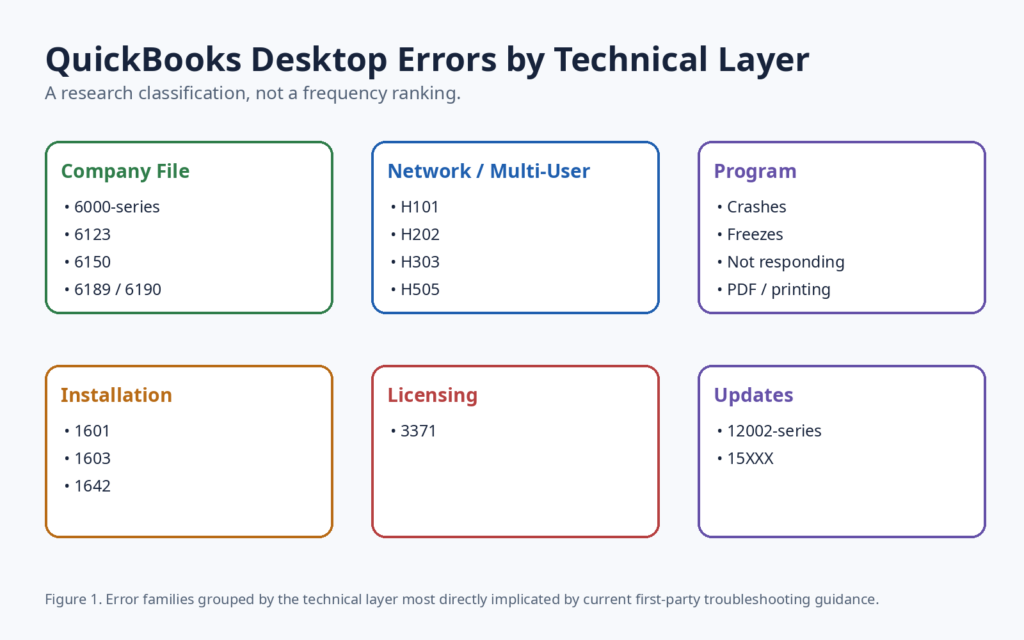
The current documentation supports a useful classification model.
| Technical layer | Representative problems |
| Company file | 6000-series, 6123, 6150 |
| Network / multi-user | H101, H202, H303, H505 |
| Program | Crashes, freezes, not responding |
| Installation | 1601, 1603, 1642 |
| Licensing | 3371 |
| Updates | 12002-series, 15XXX |
| Windows / system | Permissions, services, security and compatibility |
This classification is more useful than treating every error code as a completely independent problem.
It also resembles the way Intuit organizes its own QuickBooks Tool Hub troubleshooting categories.
1. H202 and H505: The Multi-User Error Family
H202 and H505 are among the clearest examples of why an error code should be interpreted in context.
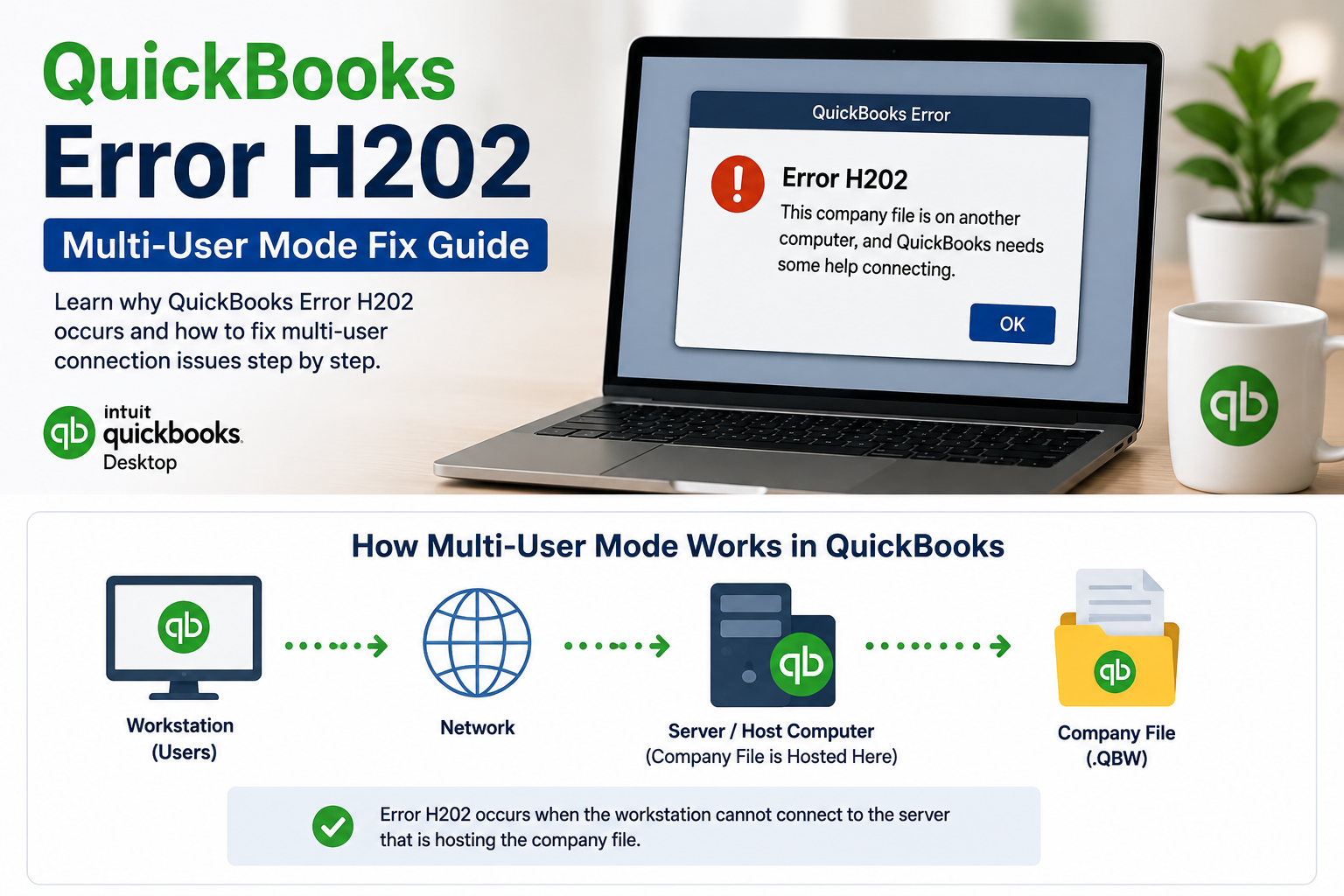
Intuit currently states that H202 and H505, along with H101 and H303, occur when something blocks the multi-user connection to the server computer. The workstations are unable to communicate properly with the company file stored on the host.
H202
H202 generally indicates a communication problem between the workstation and the computer hosting the company file.
Possible areas to investigate include:
- QuickBooks Database Server Manager
- hosting configuration
- Windows services
- firewall settings
- network communication
- folder permissions
- company-file access
H505
H505 is associated with hosting configuration. Intuit’s documentation explains that workstations should not be configured as the host when another computer is intended to host the company file.
This makes H202 and H505 fundamentally different from a simple “QuickBooks installation error.”
The application may be installed correctly.
The company file may also be healthy.
The failure can occur in the communication path between the workstation and the host.
For businesses dealing with recurring multi-user problems, professional QuickBooks Desktop support can be useful when the issue involves company-file access, network configuration, permissions or hosting rather than a simple application restart.
2. How QuickBooks Desktop Multi-User Hosting Works
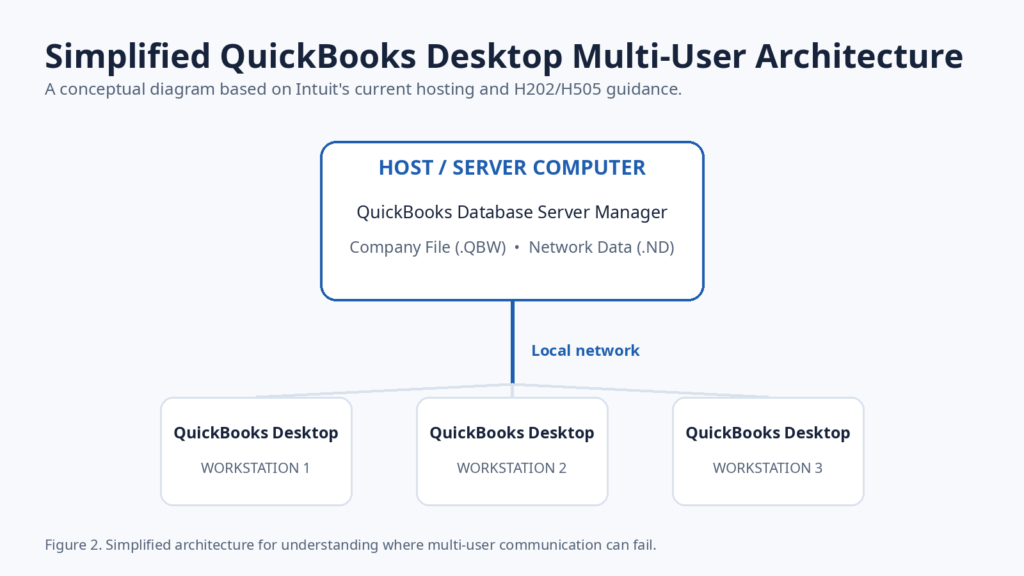
QuickBooks Desktop multi-user environments involve more than the QuickBooks application installed on each workstation.
A simplified architecture looks like this:
Workstation → Local network → Host computer → Database Server Manager → Company file
The host computer stores the company file and provides the environment required for other workstations to access it.
Intuit’s current H202 guidance specifically directs users to the QuickBooks Database Server Manager and File Doctor when troubleshooting multi-user connectivity.
Folder permissions are another part of the environment. Intuit’s current documentation notes that folders used for multi-user access need the appropriate Windows permissions.
This explains why repeatedly reinstalling QuickBooks may not solve H202.
If the underlying issue is hosting, firewall configuration, or network communication, reinstalling the workstation application does not necessarily correct the failed connection.
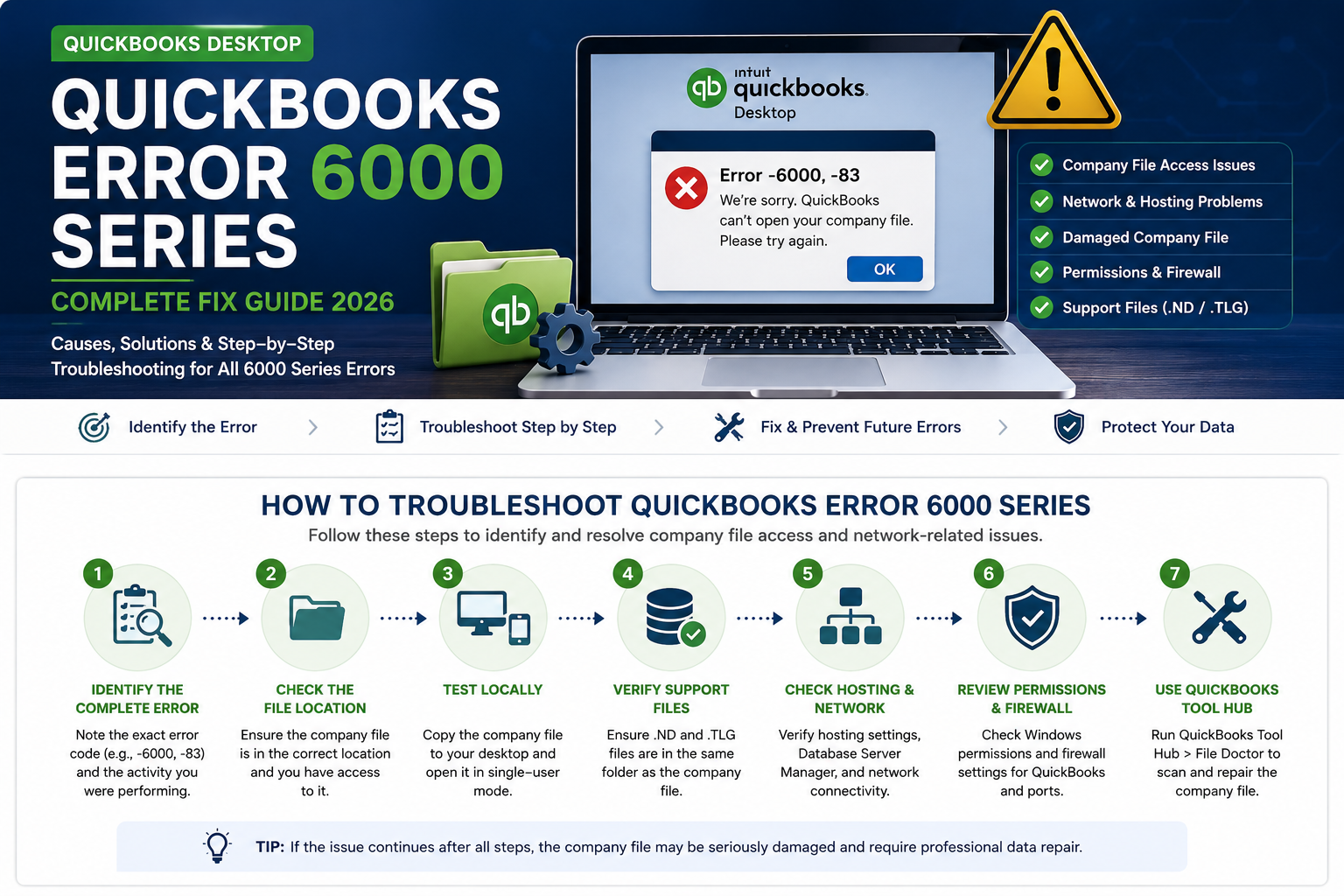
3. The 6000-Series Is Not One Problem
The phrase “QuickBooks Error 6000” is too broad to be diagnostically useful.
There are multiple combinations within the 6000 family, and the exact code can change the troubleshooting path.
Examples include:
- -6000, -82
- -6000, -106
- -6000, -301
- -6000, -305
- -6000, -83
- -6130
- -6147
- -6150, -1006
Intuit’s current File Doctor documentation specifically lists -6150, -6000-82, -6000-305, -6000-301, -6147 and -6130 among the company-file errors for which File Doctor can be used.
The exact error therefore matters.
6000-Series Diagnostic Matrix
| Error family | Primary area to investigate |
| -6000, -82 | Company-file and network access |
| -6000, -106 | Company-file and network access |
| -6000, -301 | Company-file/support-file/data issues |
| -6000, -305 | Company-file or network access |
| -6000, -83 | File access, backup or network |
| -6130 | Company-file/network environment |
| -6147 | Company-file or backup access |
| -6150, -1006 | Company-file/data environment |
For example, Intuit’s current documentation for -6000, -301 identifies possible causes including damaged QuickBooks support files, company-file damage, and certain encryption software.
That is a useful reminder that a 6000-series error does not automatically mean “the server is down.”
4. Company-File Damage Is a Separate Diagnostic Layer
Some QuickBooks problems originate inside the company file itself.
Intuit’s current data-damage guidance distinguishes problems involving company-file data from ordinary network connectivity problems.
A damaged company file can affect:
- transactions
- lists
- balances
- reports
- customer records
- vendor records
- other accounting information
The important distinction is this:
A network problem can prevent access to a healthy file.
A damaged file can remain problematic even after the network is functioning normally.
This is why repeated network troubleshooting is unlikely to solve a genuinely damaged company file.
If the company file has become inaccessible or corrupted, QB Desktop Accounting also provides a QuickBooks Data Recovery Service for assessing available recovery and repair options.
5. What QuickBooks File Doctor Actually Does
QuickBooks File Doctor is designed for a specific portion of the QuickBooks Desktop troubleshooting landscape.
Intuit’s current documentation recommends File Doctor for several company-file and network problems, including specific 6000-series errors and situations where customer, vendor, or employee lists are missing or blank.
The current process is:
- Install or open QuickBooks Tool Hub.
- Select Company File Issues.
- Run Quick Fix my File where appropriate.
- Run QuickBooks File Doctor.
- Select the relevant company file.
- Run the appropriate file or network check.
- Reopen QuickBooks and test the company file.
Intuit notes that File Doctor scans can take approximately 10 to 15 minutes depending on file size, and a scan can sometimes report that it was unsuccessful even when an issue has been corrected.
The important point is that File Doctor is a diagnostic and repair tool for a particular class of problems.
It should not be treated as a universal solution for every QuickBooks Desktop error.
6. Error 6123: The Environment Can Matter as Much as the File
Error -6123, 0 is particularly interesting because the troubleshooting path can involve both the company file and the computer environment.
Intuit’s current documentation says that -6123, 0 can occur while opening, upgrading or restoring a company file. It also specifically identifies hardware compatibility as a potential factor on ARM-based computers using processors such as Snapdragon or Qualcomm.
This creates an important diagnostic sequence.
Before assuming that the company file itself is damaged, check:
- the processor architecture
- the QuickBooks Desktop version
- whether the file is local or network-based
- whether the problem occurs with other company files
- whether the error occurs during opening, upgrading or restoring
- whether the file is being opened from QuickBooks rather than directly through Windows Explorer
Intuit’s current documentation states that QuickBooks Desktop is designed for Intel or AMD processors and that ARM-based systems may require another supported environment.
For businesses moving accounting records between systems, a QuickBooks Data Conversion Service can also be relevant when the project involves structured conversion, compatibility review and validation rather than a simple file copy.
7. Installation Errors: 1601, 1603 and 1642
Errors 1601, 1603, and 1642 belong to the installation and Windows component layer.
Intuit’s current documentation describes:
- 1601: Windows Installer is not accessible
- 1603: problem installing Microsoft .NET Framework or an internal update-installer error
- 1642: problem installing Microsoft .NET Framework during QuickBooks installation
These errors can appear during installation or updating.
That changes the troubleshooting strategy.
If Windows Installer or .NET Framework is involved, repeatedly checking the company file is unlikely to address the underlying problem.
The appropriate diagnostic path may instead involve:
- QuickBooks installation repair
- Windows components
- .NET Framework
- installation files
- system permissions
- QuickBooks Tool Hub
8. Error 3371: The Licensing Layer
Error 3371 is another example of a problem that can occur outside the company-file layer.
Intuit currently describes Error 3371 as a situation where QuickBooks cannot load its license data. Possible causes include missing or damaged license-related files.
Intuit’s current troubleshooting process includes running 3371 Error Fix from QuickBooks Tool Hub under Installation Issues.
This means a user seeing 3371 should not immediately assume that the company file is corrupted.
The application may be failing during its licensing initialization process.
That is a different technical layer.
9. Update Errors: 12002, 12007, 12009, 12029 and 12031
QuickBooks Desktop update errors provide another useful example of how an application can be affected by its surrounding environment.
Intuit currently documents errors:
- 12002
- 12007
- 12009
- 12029
- 12031
as update-related connectivity problems.
The current Intuit guidance identifies possible causes including incorrect browser or security settings and interference from antivirus or firewall software. (QuickBooks)
This is an important distinction.
QuickBooks itself may be functioning correctly.
The failure may occur because the application cannot establish the required connection to the update infrastructure.
For that reason, update troubleshooting can involve:
- internet connectivity
- browser/security settings
- firewall configuration
- antivirus software
- TLS/security configuration
- QuickBooks update settings
10. 15XXX Update Errors
The 15XXX family also belongs to the update environment rather than the company-file layer.
These errors can require investigation of QuickBooks update components, Windows configuration, and security-related components.
The practical lesson is the same:
An update error does not automatically mean that the QuickBooks company file is damaged.
When an update fails, the correct troubleshooting path should begin with the update environment.
11. QuickBooks Tool Hub Reveals the Same Technical Pattern
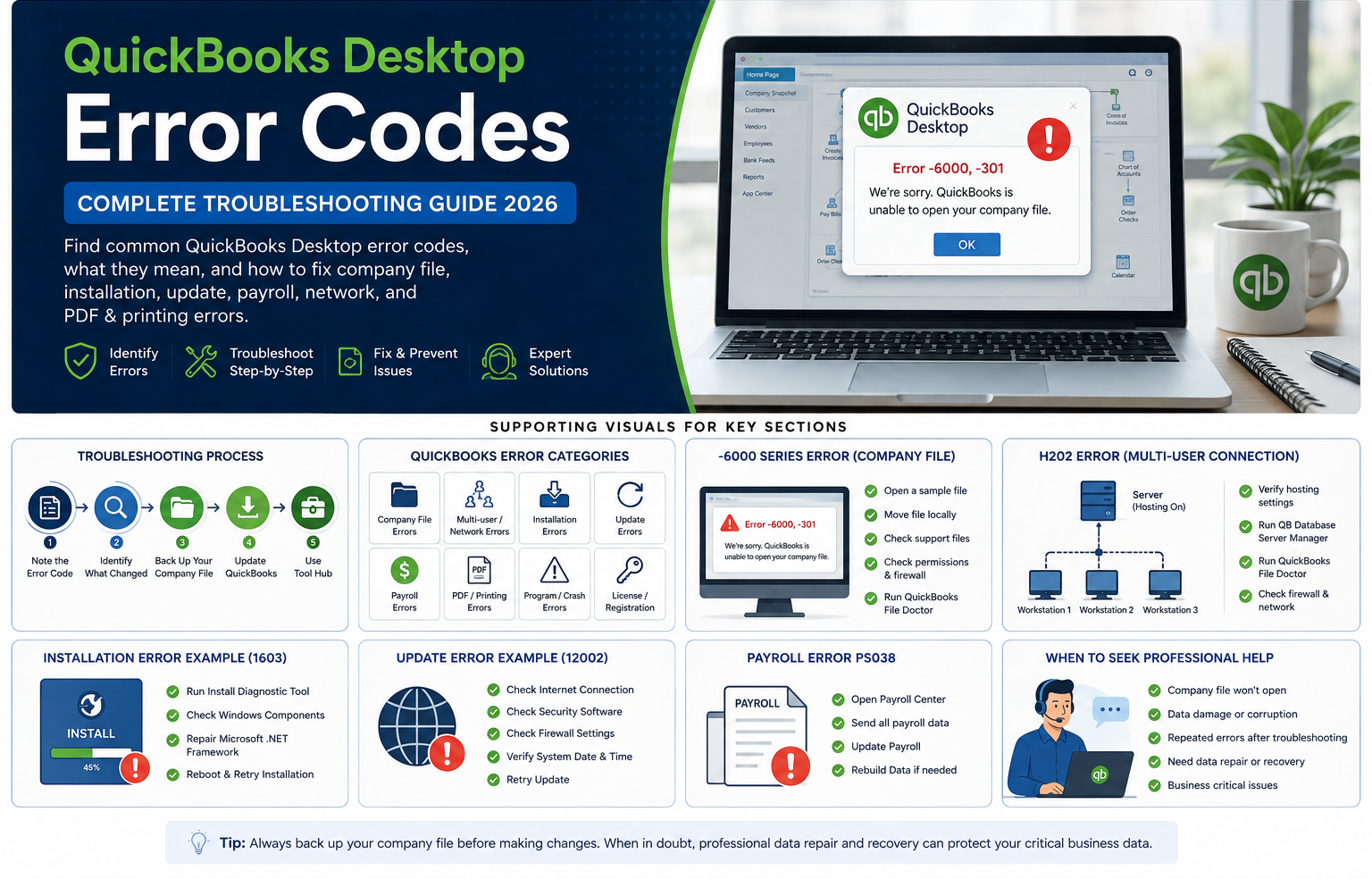
QuickBooks Tool Hub provides another useful way of viewing the error landscape.
Its troubleshooting structure separates problems into categories such as:
- Company File Issues
- Network Issues
- Program Problems
- Installation Issues
- Password Reset
- Help & Support
That structure closely corresponds with the technical layers identified in this report.
This is significant because the classification is not being created solely for this research article.
The software’s own troubleshooting structure separates these problem domains.
Intuit’s current documentation also directs users to different Tool Hub areas for problems such as H202, company-file issues, 3371, and installation problems.
12. Which QuickBooks Tool Matches Which Error?
| Problem | Tool or diagnostic path |
| H202 / H505 | Database Server Manager, network checks and File Doctor |
| 6000-series | File Doctor and company-file/network diagnostics |
| 6123 | Quick Fix my Program, File Doctor and environment checks |
| 3371 | 3371 Error Fix |
| 1601 / 1603 / 1642 | Installation Diagnostic Tool and installation repair |
| 12002-series | Internet, firewall and security checks |
| Program crashes | Quick Fix my Program and program repair |
| PDF/printing problems | Print and PDF troubleshooting tools |
The goal is not to memorize every QuickBooks error.
The goal is to identify the technical layer first.
13. Practical QuickBooks Desktop Diagnostic Model
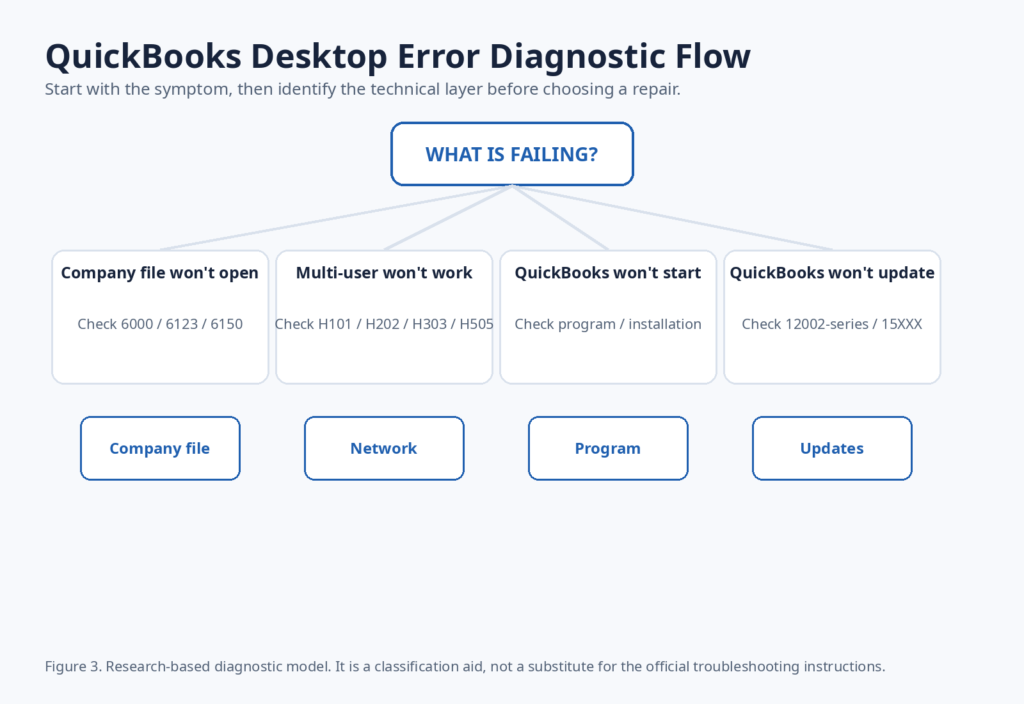
A practical diagnostic process begins with the symptom.
Company file will not open
Start by identifying the exact error.
If it is a 6000-series error, investigate the company file and network environment.
If it is 6123, investigate both the company file and the computer environment.
If it is 6150 or another data-related error, investigate the condition of the company file.
Multi-user mode will not work
Start with:
- H101
- H202
- H303
- H505
- hosting configuration
- Database Server Manager
- firewall
- permissions
- network connectivity
QuickBooks will not start
Investigate:
- program files
- Windows environment
- installation
- recent updates
- QuickBooks Tool Hub
QuickBooks will not update
Investigate:
- internet connectivity
- firewall
- antivirus
- security settings
- update components
- Windows environment
Licensing or activation fails
Investigate:
- license information
- registration
- QuickBooks installation
- Error 3371
- Tool Hub’s licensing and installation tools
This approach prevents one of the most common troubleshooting mistakes: applying the same repair to fundamentally different problems.
14. Why Reinstalling QuickBooks Does Not Always Solve the Problem
Reinstalling QuickBooks can be useful when program files or installation components are damaged.
It is not a universal repair.
Consider the difference.
H202
The problem may be hosting or network communication.
6000-series
The problem may involve the company file, network, permissions or support files.
12002
The problem may involve internet security or firewall configuration.
3371
The problem may involve licensing information.
1603
The problem may involve Windows installation components.
A reinstall may replace QuickBooks program files.
It does not automatically repair a broken network path, incorrect hosting configuration, damaged company data, or a firewall restriction.
The repair should match the failure layer.
15. What the Current Public Evidence Can Tell Us
The current evidence allows us to identify several strong patterns.
Multi-user errors are closely associated with the hosting environment
H101, H202, H303 and H505 are documented in the context of multi-user communication and hosting.
The 6000-series contains multiple diagnostic paths
The exact combination matters because different 6000-series errors can involve different company-file, network, and support-file conditions.
Installation errors can originate in Windows components
Errors 1601, 1603, and 1642 are explicitly associated with installation and update components.
Licensing problems are separate from ordinary company-file errors
Error 3371 concerns QuickBooks license data and has its own Tool Hub repair path.
Update failures can be caused by the surrounding security environment
Intuit identifies internet, browser, antivirus, and firewall factors for the 12002-series.
16. What Public Data Does Not Tell Us
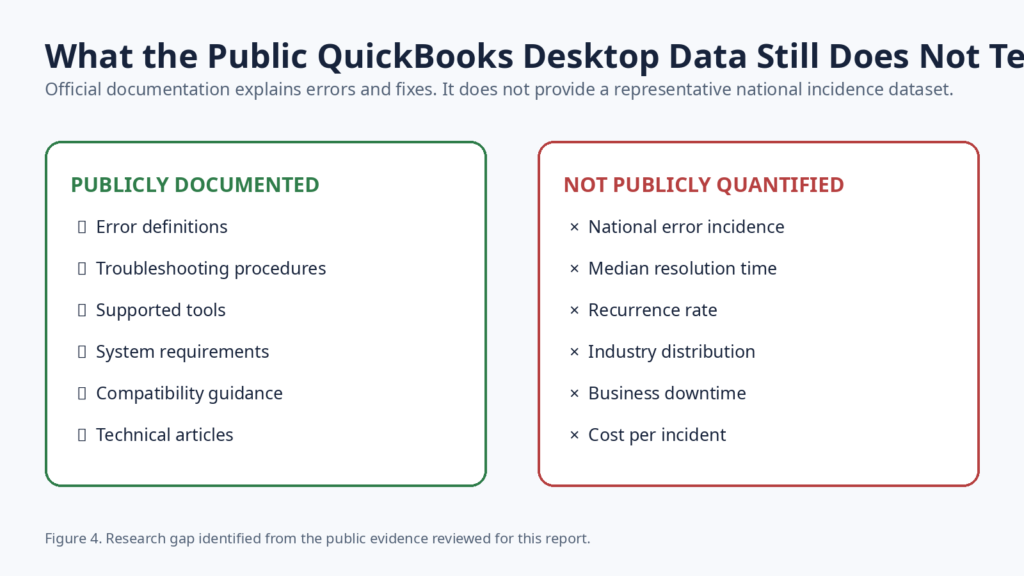
There is a substantial difference between technical documentation and industry-level statistics.
Current public documentation does not provide a representative national dataset showing:
- the percentage of U.S. QuickBooks Desktop users experiencing H202
- the percentage experiencing 6000-series errors
- the median time required to resolve each error
- recurrence rates
- average business downtime
- average financial cost per incident
- error distribution by industry
- error distribution by company size
- error distribution by QuickBooks Desktop version
- percentage of cases requiring professional intervention
These measurements would require a sufficiently large anonymized support dataset or a representative user study.
Search volume cannot substitute for that data.
17. The Biggest Research Gap in QuickBooks Desktop
QuickBooks Desktop has extensive documentation explaining what errors mean.
There is far less public information about what happens after those errors occur in real businesses.
Some of the most valuable unanswered questions are:
- Which errors take the longest to resolve?
- Which errors recur most frequently?
- Which problems most often require professional support?
- Which errors are concentrated in multi-user environments?
- Which QuickBooks versions appear most often in support cases?
- Which industries experience particular error families?
- Which errors create the longest business interruptions?
- Which problems become more common during upgrade or migration periods?
These questions represent an opportunity for future original research.
18. What a Better QuickBooks Desktop Dataset Would Look Like
A future anonymized dataset could record fields such as:
| Field | Example |
| Case ID | QB-001 |
| Error | H202 |
| QuickBooks version | 2024 |
| Number of users | 5 |
| Environment | Windows Server |
| File location | Server |
| Technical layer | Network |
| Initial symptom | Multi-user unavailable |
| Resolution | Hosting/network repair |
| Resolution time | Recorded from case |
| Recurrence | Yes / No |
| Escalation | Yes / No |
No customer names, company names, financial account numbers, or other identifying information would be necessary.
With a sufficiently large dataset, future editions could measure:
- error incidence
- median resolution time
- recurrence
- version distribution
- industry distribution
- single-user versus multi-user environments
- local versus network company files
- professional-support escalation
That would represent a much deeper level of industry research than a conventional troubleshooting article.
19. Why This Matters to Small Businesses
For a small business, an accounting software error is rarely just a software inconvenience.
A company-file problem can affect:
- invoicing
- accounts receivable
- accounts payable
- payroll
- bank reconciliation
- financial reporting
- tax preparation
- month-end close
That is why diagnostic accuracy matters.
The objective should not simply be to make the error message disappear.
The objective is to identify the underlying failure, protect the accounting data and restore the workflow with the least unnecessary disruption.
For businesses that need broader accounting assistance after a technical issue is resolved, professional accounting services can help with maintaining organized financial records and ongoing accounting workflows.
Similarly, businesses that need ongoing transaction management and reconciliation can explore online bookkeeping services.
20. Related QuickBooks Research and Guides
The error landscape does not exist separately from everyday accounting operations.
For businesses dealing with migration, Windows changes, or accounting workflow disruptions, these related resources provide additional context:
- QuickBooks Migration Failed Unexpectedly on Windows 11 covers migration-related problems and Windows 11 environments.
- QuickBooks PDF Component Error: Complete Fix Guide covers PDF and printing-related program issues.
- Accounting Workflow for Small Businesses Using QuickBooks Desktop looks at how QuickBooks fits into broader accounting operations.
- QuickBooks Desktop Support covers company-file, data recovery, migration, installation, and technical support.
Conclusion
QuickBooks Desktop errors are not random collections of unrelated numbers.
They tend to follow the technical environment in which the failure occurs.
H202 and H505 point toward the multi-user and hosting layer.
The 6000-series requires closer examination of the exact error combination and the company-file environment.
6123 can involve both the company file and hardware or system compatibility.
1601, 1603 and 1642 belong primarily to the installation and Windows component layer.
3371 points toward licensing information.
12002-series errors can involve internet connectivity, security settings, antivirus software, and firewalls.
The practical lesson is straightforward:
Identify the failure layer before choosing the repair.
That approach is more reliable than treating every QuickBooks Desktop problem as a generic installation issue or assuming that every company-file error means the data is corrupted.
The second major finding is about the state of public information itself.
QuickBooks Desktop has extensive technical documentation, but there is still a significant gap in publicly available quantitative research about error frequency, resolution time, recurrence, downtime, and business impact.
That gap creates an opportunity for better industry research.
A future dataset built from anonymized support cases could move the discussion from:
“What does Error H202 mean?”
to:
“How often does H202 occur, how long does it take to resolve, what environments produce it, and what business conditions make it recur?”
That is the kind of data that could provide genuinely new information to QuickBooks Desktop users, accountants, IT professionals, and researchers.
Sources and Research Resources
The primary research base for this report consists of current Intuit documentation.
- Intuit: How to fix Error H202 and H505
- Intuit: QuickBooks File Doctor for company-file and network issues
- Intuit: Error -6000, -301
- Intuit: Error -6000, -82 and -6000, -106
- Intuit: How to fix Error 6123, 0
- Intuit: Errors 1601, 1603 and 1642
- Intuit: Error 3371 and license properties
- Intuit: Errors 12002, 12007, 12009, 12029 and 12031
- Intuit: Windows folder and access permissions for company files
About This Report
Publisher: QB Desktop Accounting
Report: 2026 QuickBooks Desktop Error Landscape Report
Research edition: 2026.1
Research period: 2026
Updated: August 2026
Geographic focus: United States
Product focus: QuickBooks Desktop for Windows
Primary evidence: Intuit QuickBooks Desktop documentation
Secondary evidence: Intuit Community discussions
Suggested citation:
QB Desktop Accounting. 2026 QuickBooks Desktop Error Landscape Report: What Breaks, Why It Happens & What the Data Shows. Research Edition 2026.1, August 2026.