
Roger McDonald did a wonderful job! He took his time to explain everything and how things were going throughout the process. The QuickBooks issue has been resolved!
Kerri Eckenrode R. L. Snyder Electric, Inc.HOME | SERVICES | QUICKBOOKS DATA CONVERSION SERVICE
QuickBooks conversion support
QuickBooks Data Conversion Service For Your Business
Convert accounting data from supported software, files, or QuickBooks versions into a compatible QuickBooks environment with structured data mapping, validation, and post conversion review.
We help businesses and accounting professionals in the USA and Canada move financial records while keeping data accuracy and reporting continuity in focus.
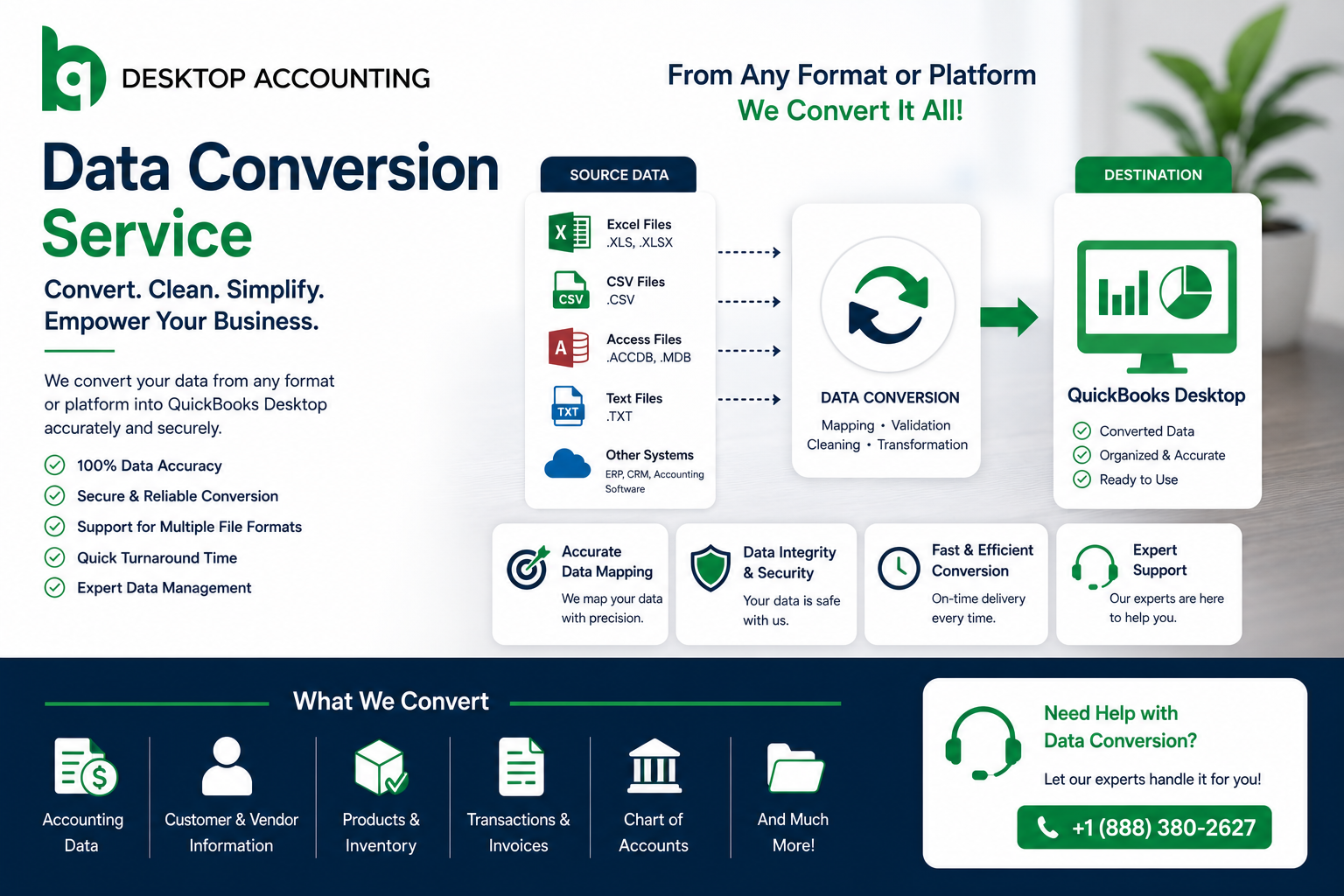
Data MappingWe review your source data and map it to the appropriate QuickBooks structure.

Service overview
Professional QuickBooks Data Conversion Service
Moving accounting information into QuickBooks is more than importing a file. Different accounting platforms organize customers, vendors, accounts, transactions, products, payroll information, and reports in different ways.
Our QuickBooks data conversion service is designed to make smooth transitions. We help businesses move critical financial data without disrupting daily operations, so you can continue working with confidence.
Our QuickBooks data conversion services are built for businesses that need a reliable way to transfer records. Our team makes the process simple and efficient.
Conversion support
How Do We Provide QuickBooks Data Conversion Support?
Migrating accounting data requires multiple post-conversion checks to make sure your books stay accurate.
Our process is ideal for businesses looking for:
- QuickBooks data migration from legacy systems.
- QuickBooks Data Conversion Tools support and guided setup.
- QuickBooks cloud migration services for remote access and flexibility.
- QuickBooks desktop to online conversion for easier collaboration and scalability.
Records we handle
What Data Conversion Do We Perform?
Our QuickBooks data conversion services can help transfer a wide range of accounting data, depending on your source file and target version. This may include:
| Data Type | Description |
|---|---|
| Customers | Customer records and contact details. |
| Vendors | Vendor records and supplier details. |
| The Chart Of Accounts | Your complete list of accounts used for bookkeeping. |
| Invoices | Sales invoices that are created for customers. |
| Bills | Vendor bills and payables. |
| Estimates | Quotation or estimate records. |
| Purchase Orders | Orders placed with vendors. |
| Sales Orders | Customer sales order records. |
| Open Balances | Unpaid balances that remain outstanding. |
| Summary Financial Information | Financial summary data, such as totals and account-level summaries. |
Request a free quote today to know how we support you in detail.

Step-by-step checks
Process for Our Data Conversion Service
First, we analyze your existing system and the kind of data that you want to convert. Usually, our process involves:
- 1 An initial assessment of your data source and conversion requirement.
- 2 Cleaning up and organizing data before conversion.
- 3 Conversion and transfer of applicable records.
- 4 Verification and balancing after conversion.
- 5 Post-conversion support in case issues arise during go-live.
Client feedback
What Do Our Clients Say?
Real feedback from businesses we've helped migrate to QuickBooks
Brittany and Roger were very helpful and did the work in a timely manner and were very nice. Easy to work with and helpful when I had questions!
Sarah Pflug Administrative SecretaryQuickBooks issue has been resolved. Cristina has been very helpful in resolving this issue and guiding us through the process smoothly.
Dawn Combs Administrative Assistant, Phoenix Commercial Builders LLC
FAQ QUESTION
QuickBooks Data Conversion Services FAQs
Answers to the most common questions about moving accounting records between QuickBooks versions and platforms.
Ask an expert1. What is QuickBooks data conversion?+
QuickBooks data conversion is the transition of accounting information from QuickBooks Desktop to QuickBooks Online or vice versa, maintaining an organized record format.
2. How does QuickBooks data migration differ from data conversion?+
While QuickBooks data migration is more of a transition process, data conversion ensures that all necessary information is correctly formatted and structured for the target platform.
3. Do you assist in the QuickBooks desktop to online conversion?+
Yes, QuickBooks desktop to online conversion is one of the most popular types of services we offer. We can help you with that. Get in touch with our experts.
4. Do you have any QuickBooks data converter tools handy?+
QuickBooks provides an internal migration tool to move from the Desktop version to the Online version, and there are partners such as Dataswitcher and dedicated third parties for complicated data conversion tasks.
5. How long do your QuickBooks cloud migration services take?+
It depends on several factors, including your file size, file conditions, etc., but simple files migrate much faster than complicated ones. Contact us for an estimate specific to your situation.
Get advice from your experts.
We will answer any questions you may have about our services
Book Free Consultation