


QuickBooks is supposed to simplify things – that’s literally the whole pitch. So when QuickBooks keeps crashing, it doesn’t just slow you down – it makes you question everything. Did you lose that invoice? Is the backup from last week even valid? How are you supposed to run payroll if the app won’t even stay open?
Well, you’re not alone. Crashing is common and fixable, too but rarely one-size-fits-all.
This guide breaks down the why, the how, and the what-next, without pretending there’s a magic button that’ll make it all stop. Let’s get into it.
Crash patterns matter – more than you think
There’s always a trigger. QuickBooks doesn’t just shut down “randomly,” even if it feels that way.
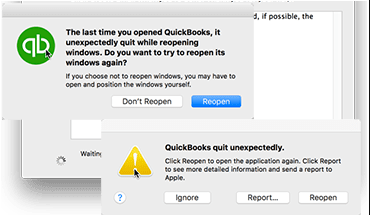
Here’s where most people get hit:
- Opening a large company file
- Switching between company files
- Sending an invoice or form through email
- Importing bank transactions
- Running payroll reports or balance sheets
- Immediately after launching the app
Now read that again and clock your pattern. If QuickBooks crashes when opening company file, your next steps will differ from someone whose email from QuickBooks is not working and causing shutdowns.
Different issue. Different fix.
What’s usually behind QuickBooks crashing
A few usual suspects cover most cases. They show up over and over again; on forums, in support logs, and behind those panicked Slack messages from your finance team.
- Corrupted company file – especially if it’s large or wasn’t properly closed last session
- Outdated QuickBooks build – older versions can’t keep up with newer Windows updates
- Broken install files – maybe QuickBooks didn’t install right in the first place
- Firewall or antivirus conflict – especially after a security software update
- Email configuration issues – yes, bad email settings can crash your app
- QuickBooks not playing nice with Windows 11 – compatibility issues are very real
- Broken user profile on Windows – your system user account might be corrupted
It doesn’t have to be all of these but if QuickBooks Desktop keeps crashing, it’s likely one of these or a mix.
Start here – no, really
Update everything. QuickBooks. Windows. Your antivirus. Even Outlook if you’re using it for mail. This feels too basic to be effective, but you’d be surprised how many crash loops resolve themselves after a fresh round of updates.
How to update QuickBooks:
- Open the app
- Go to Help > Update QuickBooks Desktop
- Click Update Now
- Check Reset Update
- Hit Get Updates, then restart
If you’re seeing crashes on Windows 11, updating is critical. Many reports of QuickBooks keeps crashing Windows 11 came down to old builds clashing with recent system patches.
Next move: the Tool Hub
Intuit’s QuickBooks Tool Hub isn’t flashy. But it works. It automates fixes for damaged installations, file corruption, and performance glitches.
Steps:
- Close QuickBooks completely
- Download Tool Hub from Intuit’s official site
- Install and launch
- Go to Program Problems > Quick Fix my Program
- Let it run, then test your QuickBooks app again
Still crashing? Head to Company File Issues and use the built-in File Doctor to check for damage.
Not working? Try this…
Repair your installation.
- Control Panel → Programs and Features
- Find QuickBooks → Uninstall/Change → Repair
- Follow the prompts
- Restart when it’s done
This rebuilds broken program files without touching your data.
Rename your .INI file.
Sometimes QuickBooks crashes before even opening a file – especially if it’s trying to auto-load a corrupted session.
Navigate to:
C:\Users\[YourUsername]\AppData\Local\Intuit\QuickBooks [Year]\
Rename QBWUSER.INI to QBWUSER.INI.OLD
Reopen QuickBooks. If it launches cleanly, that file was the problem.
Email crashes?
If QuickBooks crashes right when you hit “send,” it’s likely tied to email misconfiguration. Either the outgoing server settings are wrong or you’ve got a damaged MAPI32.dll file.
Use Tool Hub’s Email Issues tab if available. Or:
- Go to Edit > Preferences > Send Forms
- Re-add your email account
- Ensure SSL is on and the port matches your provider
- Try switching to secure webmail
Fixing email setup often clears out issues where QuickBooks crashes when sending email or attachments.
Firewall problems?
Security software is a common villain – it doesn’t always trust QuickBooks.
Make sure QuickBooks is whitelisted in:
- Windows Defender Firewall
- Any third-party antivirus
- Outlook’s send/receive permissions (if connected)
QuickBooks runs multiple background processes. If even one is blocked, the system might shut down unexpectedly.
Things getting too complicated? Test a new user account
If nothing’s helping and the app crashes only under your Windows profile, it might be that your device is riddled with a corrupted user account.
Test this:
- Create a new Windows user (Settings → Accounts → Other Users)
- Give it admin access
- Log in, install QuickBooks (or just run it), and see if it crashes
If it works fine there, you’ve found the issue.
Still broken? Time to clean install
When all else fails, go nuclear – wipe and rebuild.
- Uninstall QuickBooks via Control Panel
- Download the Clean Install Tool from Intuit
- Run it – it removes leftover files and registry entries
- Reinstall QuickBooks using the latest setup
- Restore your company file from backup
A full clean install clears out buried bugs, especially the ones that survive version updates.
Don’t just fix – future-proof it
Once you’ve made it through, prevent another spiral. Here’s how:
- Back up your company file every single day. No exceptions.
- Rebuild your data weekly (File > Utilities > Rebuild Data)
- Close memory-heavy apps before opening QuickBooks (especially Chrome tabs and Outlook)
- Add QuickBooks to your firewall and antivirus exception list
- Avoid storing your file on a network drive unless it’s properly configured
- Don’t skip updates – for QuickBooks, Windows, or even email clients
This applies whether you’re on a tiny local install or running QuickBooks for a whole team.
FAQs
- Why does QuickBooks crash every time I open it?
It’s likely trying to auto-load a broken session or corrupted company file. Rename your QBWUSER.INI file and relaunch manually.
- What if QuickBooks crashes only when I open one file?
That file’s probably damaged. Use Verify and Rebuild under the File menu. Or run File Doctor in Tool Hub.
- Can bad email settings crash QuickBooks?
Yes. If the configuration is off – wrong port, outdated credentials, or broken integration; it can trigger a crash the moment you hit send.
- Why is QuickBooks crashing on Windows 11?
Older QuickBooks versions don’t always play well with Windows 11. Updating system libraries like .NET and MSXML often helps, but sometimes a clean install is the only fix.
- Is reinstalling always necessary?
Not at all. In fact, It’s the last resort. Try updates, Tool Hub, and repair installs first. Only reinstall if all else fails.
- Why does QuickBooks Desktop keep crashing after updates?
Sometimes updates conflict with lingering registry data or cached files. A clean install or resetting preferences can resolve post-update crash loops.
Final takeaway:
If QuickBooks keeps crashing, it’s annoying – but almost always fixable. You don’t need to be ridiculously tech-savvy to get it stable again. Slow down, test one variable at a time, and don’t underestimate the power of a clean rebuild when the usual tricks don’t stick.
